Microsoft Publisher will no longer be supported after October 2026. In October 2026, Microsoft Publisher will reach its end of life. After that time, it will no longer be included in Microsoft 365 and existing on-premises suites will no longer be supported.
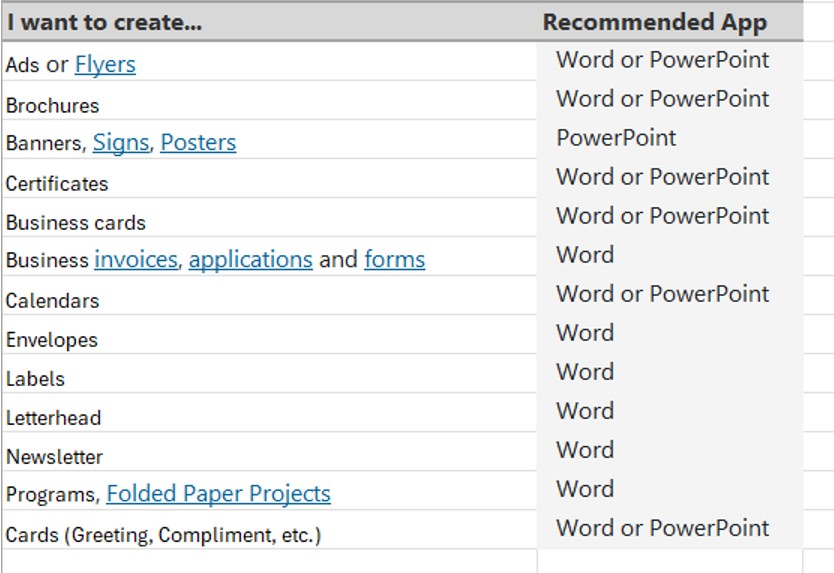
Microsoft 365 subscribers will no longer be able to open or edit Publisher files in Publisher. Until then, support for Publisher will continue and users can expect the same experience as today. Many common Publisher scenarios—including creating professionally branded templates, printing envelopes and labels, and producing customized calendars, business cards, and programs—are already available in other Microsoft 365 apps such as Word and PowerPoint.
How will this affect you:
You can continue to use Publisher with its current functionality until 1st October 2026 but Microsoft 365 subscribers will not be able to access Publisher after 1st October 2026.
Support for the perpetual version of Publisher will end on 13th October 2026, when Office LTSC 2021 and Consumer Office 2021 reach end of support.
How to prepare before October 2026:
Action Recommended: Convert your existing files to another format before 1/10/2026. After this date, you will no longer be able to open or edit these files in Microsoft Publisher.
How to prepare your files for Publishers retirement by saving them in another format
View content after Publishers retirement by converting to PDF formant:
Steps to Convert Publisher Files to PDF
1. Open Publisher file.
2. Go to File > Save as.
3. Choose a location to save the file.
4. Select PDF as the file type and Save.
Edit content after Publishers retirement by either:
Steps to Convert PDF Files to Word
1. Open Word.
2. Go to File > Open.
3. Locate and open the PDF file.
4. Select OK in the dialog box.
To complete common scenarios in Publisher, we recommend the following Microsoft 365 apps: